How to Run Google Ads for Ecommerce: Step-by-Step Setup
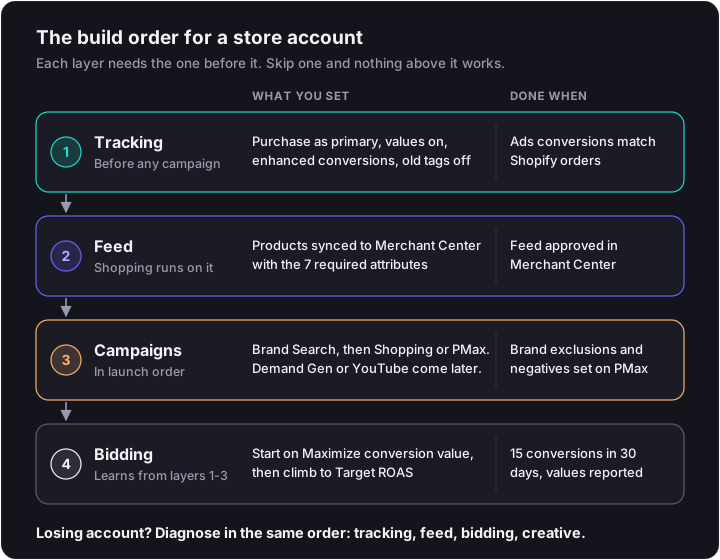
Learning how to run Google Ads for an online store starts with what happens before the first campaign. Most store accounts fail on data, not ads. Smart Bidding chases the purchases and values you send it, and a lot of accounts send none, or count each one twice. The setup has to follow a strict order: tracking, feed, campaigns, then bidding.
How to Run Google Ads for an Online Store, in Order
Track purchases with values, fix your Merchant Center feed, then launch brand Search and Shopping or Performance Max. Don't move to Target ROAS until Search and Shopping have at least 15 conversions in 30 days. That's Google's own floor.
The core diagnosis is sequencing. Tracking and the feed come before any campaign, because Shopping and Performance Max can't run without the feed and no bid strategy can work without purchase values. Google is one of several PPC platforms a store can run, and its setup punishes skipped steps harder than most.
| Step | What you do | The Google or Shopify rule behind it |
|---|---|---|
| 1. Account and budget | Set billing and an average daily budget | No minimum spend; a day can spend up to 2x the daily budget, the month caps at 30.4x |
| 2. Tracking | Connect the Shopify Google & YouTube app, make purchase primary, turn on enhanced conversions | Default actions are purchase, add to cart and checkout started; remove legacy tags to avoid double counting |
| 3. Feed | Sync products to Merchant Center and clear disapprovals | id, title, description, link, image_link, availability and price are required |
| 4. Campaign order | Brand Search, then Shopping or Performance Max, later Demand Gen or YouTube | Eight campaign types; PMax spans YouTube, Display, Search, Discover, Gmail and Maps |
| 5. Bidding | Start on Maximize conversion value, graduate to Target ROAS | 15 conversions in 30 days on Search and Shopping, with conversion values set |
| 6. Keywords and negatives | Pick match types, add negatives by hand | Negatives don't match close variants |
| 7. Ads and assets | Build RSAs and PMax asset groups | RSAs need at least 3 headlines and 2 descriptions; PMax auto-creates video if you supply none |
Step 1: Account, Billing and the Budget Math
Create the account, add billing, and set an average daily budget. Google has no minimum spend.
The daily budget isn't a hard daily ceiling, though. Google Ads Help states a campaign can spend up to 2x its average daily budget on a given day, and the monthly charge is capped at 30.4x the average daily budget. Some days run hot, others run light, and the month evens out.
That catches founders who check spend on a Tuesday and think the account broke. It didn't. It's working as designed.
Converting a Monthly Budget to a Daily One
Divide the monthly number by 30.4. The figures below are hypothetical budgets, run through Google's rules.
| Monthly budget (hypothetical) | Average daily budget (÷30.4) | Max single day (2x) | Monthly cap (30.4x) |
|---|---|---|---|
| $1,500 | ~$49 | ~$99 | $1,500 |
| $3,000 | ~$99 | ~$197 | $3,000 |
| $6,000 | ~$197 | ~$395 | $6,000 |
How much belongs in search at all versus Meta or TikTok is its own call, and it's worth settling with a clear view of paid search vs paid social before you fund either.
Step 2: Purchase Tracking With Values, Before Any Campaign
This step decides whether bidding works at all. Smart Bidding optimizes to the conversions and values you send it. If purchase value is missing, the algorithm can't tell a $20 order from a $200 one. If purchases count twice, it bids up on phantom revenue.
Every later step sits on this one. Get it wrong and nothing downstream recovers.
The Shopify Google & YouTube App Defaults
Shopify's Google & YouTube app syncs your store to Google and handles tracking. When you link Google Ads inside the app, it sets three default conversion actions:
- Purchase
- Add to cart
- Checkout started
Make purchase the action that drives bidding. Add to cart and checkout started are useful signals to watch. They're poor things to optimize toward, because Google will happily find you people who add to cart and leave.
Turn On Enhanced Conversions
Enhanced conversions send hashed first-party data, such as email (SHA256-hashed), so Google can match conversions to signed-in Google accounts. Google Ads Help credits it with better measurement accuracy and "more powerful bidding." You can switch it on when you connect the app or later.
Turn it on at connection. There's no reason to wait. The same logic applies on Meta, where server-side tracking does the matching job.
The Duplicate-Tag Trap
Older stores often have a Google tag hard-coded in the theme from a previous setup. Add the app on top and every purchase fires twice.
Google Merchant Center Help is direct about the fix: set the app's conversions as primary and remove the legacy tags. If conversions in Google Ads run well ahead of Shopify orders, you're double counting.
Conversion Values and the New-Customer Parameter
Target ROAS isn't available until conversion values are set. No values, no value bidding.
If you care about new buyers over repeat ones (most DTC brands should), Google's new customer acquisition reporting works only with Purchase conversions. It uses a new_customer or customer_type parameter, and Shopify is supported.
Step 3: Build a Merchant Center Feed That Gets Approved
The Google & YouTube app syncs products and store info to Google Merchant Center automatically. Eligible US stores also get free Shopping listings. Shopping and Performance Max both depend on the feed, so it has to be clean before any campaign goes live.
Google's product data specification sets the required fields for online products.
| Attribute | Required? | Limit or note |
|---|---|---|
| id | Yes | Unique per product |
| title | Yes | Max 150 characters |
| description | Yes | Max 5,000 characters |
| link | Yes | Product page URL |
| image_link | Yes | Main product image |
| availability | Yes | In stock, out of stock, etc. |
| price | Yes | Must match the landing page |
| brand | Required for new products in most categories | |
| GTIN | "Strongly recommended if available" | Supply it if you have one |
| condition | Required if used or refurbished |
Titles and images carry most of the weight in Shopping. If the page they land on doesn't sell, that's product page work, not a feed problem.
Step 4: Choose Campaign Types and the Launch Order
Google's creation flow runs objective, then goals, then campaign type. Eight types are on offer: Search, Display, Video, Shopping, Demand Gen, App, Smart and Performance Max.
For a store, launch in this order:
- Brand Search. Cheap, high-intent, and it protects your name.
- Shopping or Performance Max. Feed-driven, where most store revenue comes from.
- Demand Gen or YouTube, later. Only once conversion volume can support them.
Performance Max reaches YouTube, Display, Search, Discover, Gmail and Maps from one campaign. Because it can bid on your brand terms, Google advises brand exclusions and negative keywords to control overlap with Search.
How to split Shopping and PMax, when to use feeder campaigns and how to defend brand terms are structure decisions, and they live in our Google Ads strategy breakdown. Video-first formats get their own treatment under YouTube ads.
Step 5: The Bidding Ladder and Google's Thresholds
Bidding is a ladder. Climb it too early and the algorithm guesses.
- Start on Maximize conversion value, or Maximize conversions if values aren't flowing yet.
- Move to Target ROAS once Search and Shopping reach 15 conversions in the past 30 days and conversion values have been reported for 1-2 conversion cycles.
- Set the target from the prior 4 weeks' ROAS, excluding conversion delay.
- Expect learning to last up to about 50 conversion events or 3 conversion cycles.
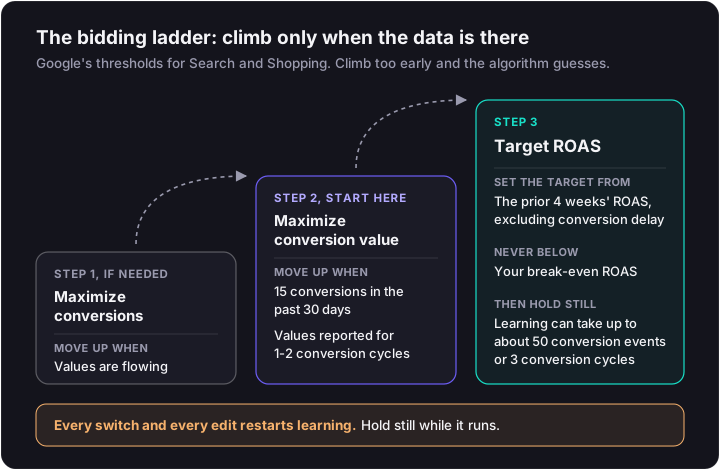
Google's Target ROAS eligibility varies by campaign type.
| Campaign type | Target ROAS eligibility (Google) | Notes |
|---|---|---|
| Search and Shopping | 15 conversions in the past 30 days | Conversion values must be set |
| Display | 15 conversions | With values across campaigns |
| Demand Gen | 50 conversions in 35 days | At least 10 in the last 7 days |
| Video action | 30 conversions in 30 days |
Target CPA requires conversion tracking too. With conversion history, Google recommends a target equal to your average CPA over the last 30 days, adjusted for conversion delay. If the difference between the two metrics is fuzzy, sort out CPC vs CPA first.
Don't set a Target ROAS from gut feel. Run your margins through the break-even ROAS calculator so you know the floor before you pick the target.
Demand Gen Budget Sanity Check
Google's Demand Gen guidance calls for a daily budget of at least 10x your target CPA. A $10 target CPA means $100 a day. It also wants at least 50 conversions.
Google adds three operating rules:
- Avoid major changes during learning.
- Keep bid adjustments within +/-15% across the campaign.
- Judge results on trends of 30 days or more.
That's why Demand Gen sits late in the launch order. Most new store accounts can't feed it enough budget or conversions in month one.
Step 6: Keywords, Match Types and Negatives
Match types control how loosely Google reads your keywords. Negatives control what it never touches.
| Match type | Syntax | What it matches | Use it for (store context) |
|---|---|---|---|
| Broad | keyword | Related searches; the default | Pair with Smart Bidding once purchase tracking is solid, as Google recommends |
| Phrase | "keyword" | Searches that include the meaning | Product category terms you want some reach on |
| Exact | [keyword] | Same meaning or intent | Brand terms and proven product queries |
| Negative | -keyword (broad, "phrase" or [exact]) | Excludes matching search terms; no close variants | Blocking "free", "used", competitor or job-seeker terms |
Negative keywords won't match close variants or other expansions, so "cheap" doesn't block "cheaper." Add plurals and misspellings yourself.
Step 7: Ads and Assets, RSA and Performance Max Minimums
Google's minimums get an ad live. They don't get it to perform. Video and vertical images matter most in Performance Max, because if you skip video, Google builds one for you from your images.
Responsive Search Ads
Each RSA takes up to 15 headlines (30 characters) and 4 descriptions (90 characters). The minimum is 3 headlines and 2 descriptions. Path fields hold 15 characters.
Google recommends at least 2 RSAs per ad group rated Good or Excellent on Ad Strength. Write distinct headlines: benefit, proof, offer, product name. Fifteen versions of the same claim give the system nothing to test.
Performance Max Asset Groups
These are Google's specs per asset group.
| Asset | Minimum | Maximum | Limit or recommendation |
|---|---|---|---|
| Headlines | 3 | 15 | 30 characters; at least one of 15 characters or less |
| Long headlines | 1 | 5 | 90 characters |
| Descriptions | 2 | 5 | 90 characters |
| Square logo | 1 | 5 | Required |
| Images | Not set | 20 per orientation | 4+ horizontal and square, 2+ vertical recommended |
| Videos | 0 | 15 | Auto-created if none supplied |
Supply your own video. An auto-generated slideshow is what Google shows on YouTube when you don't, and it rarely sells. Turning real customer footage into PMax assets is a creative job, and the approach sits in our DTC Google Ads playbook.
The 2026 Bid Strategy Changes
Two changes alter how an existing account behaves.
- The relabel. From June 2026, "Maximize conversion value with a Target ROAS" is labelled simply "Target ROAS." The mechanics are unchanged.
- Budget-constrained targets. From 17 August 2026, Target CPA and Target ROAS campaigns that are limited by budget (Search, Shopping, PMax and Demand Gen) optimize consistently to the target instead of beating it. Google's FAQ is explicit: it "won't automatically adjust your daily budgets or your campaign bid targets."
If a capped campaign used to beat its target comfortably, expect that to stop. Recheck the target and the budget yourself.
Launch Checklist and the First 30 Days
Clear every item before you hit publish:
- Purchase set as the primary conversion
- Legacy tags removed
- Enhanced conversions on
- Conversion values flowing
- Feed approved in Merchant Center
- Brand exclusions and negatives set on PMax
- Budget converted with the ÷30.4 rule
Then check, in order, without fiddling. Learning can take up to about 50 conversion events or 3 conversion cycles, and edits restart it.
| Week | What to check | What not to touch |
|---|---|---|
| 1 | Google Ads conversions match Shopify orders; feed diagnostics in Merchant Center | Bid strategy and budget |
| 2 | Search terms report; add negatives for irrelevant queries | Targets and match types |
| 3 | Asset and RSA performance; replace weak headlines and images | Bid strategy (still in learning) |
| 4 | Count conversions against the 15-in-30 Target ROAS threshold | Target ROAS switch if you're short of 15 |
When the Account Is Already Running and Underperforming
Diagnose in the same order you'd build. Tracking first, then feed, then bidding, then creative.
Most losing accounts break at the top. Duplicate tags inflate conversions, missing values blind Target ROAS, or a campaign jumped to Target ROAS before it had 15 conversions in 30 days. Fixing headlines won't save an account that bids on bad data. A structured paid media audit walks through each layer in that order.
Get the Setup Built and Run for You
Chance Ecom runs creative and paid media as one team. That covers the feed and purchase tracking, the bidding ladder, and the real video, images and headlines that Performance Max and Search actually need to serve well. Our performance marketing work starts from the data layer up, not from a template campaign.
Not ready to hand it over? Start with a free creative teardown of the ads you're running now.
You
Can you look at our ads?
Want this read on your own ads?
We pull your live ads from the Meta Ad Library, set them next to the longest-running ads in your category, and send back what we'd change and test next. The teardown is free.
Get my free creative teardownWe usually reply within one business day.